
Keyword research is the foundation of every page that ranks on Google. When done correctly, keyword research and SEO work together as a single strategy — one finds what people search for, the other ensures your content gets found. Here’s the exact process I use for every client — from seed keywords to a complete content strategy, step by step.
If you’ve ever wondered how do you do keyword research properly — not just looking up a few terms, but building a strategy that actually drives organic traffic — this guide is for you.
I’ve been doing keyword research for SEO across 50+ client projects over 8 years. The process I’m about to share is the same one I use to research keywords for SEO across 200–400 keyword cluster strategies for businesses competing in the US and global markets. I personally researched 262 keywords for sakthivelraju.com alone, covering 11 topic clusters — and I’ll show you exactly how I did it.
No fluff. No generic advice. Just the exact steps, with real examples.
What Is Keyword Research and Why Does It Matter?
Keyword research is the process of finding and analysing the specific words and phrases people type into search engines — and then using that data to create content that answers those searches better than anyone else.
Done well, keyword research tells you:
- What your target audience actually searches for — not what you think they search for
- How many people search for each term per month — so you can prioritise by traffic potential
- How competitive each keyword is — so you can identify winnable opportunities
- What intent sits behind each search — so you create the right type of content
- What your competitors rank for that you don’t — so you can close the gap
Why it matters for rankings: Google’s job is to match search queries to the most relevant, helpful pages. If your content doesn’t match what people are searching for — in terms, structure, and intent — Google won’t rank it, no matter how well-written it is. Keyword research is how you ensure alignment between what people search and what you publish.
Understanding Search Intent — The Most Important Concept in SEO
Before you learn how to conduct keyword research, you need to understand search intent — the reason behind a search query. Google is extremely good at recognising intent and matching it to content type. If your page doesn’t match the intent of the keyword, it won’t rank, regardless of optimisation.
There are four main types of search intent:
| Intent Type | What the Searcher Wants | Content Type to Create | Example Keywords |
|---|---|---|---|
| Informational | To learn something or answer a question | Blog posts, guides, tutorials | how to do keyword research", "what is SEO" |
| Commercial | To research before making a decision | Comparison posts, reviews, listicles | best keyword research tools", "semrush vs ahrefs" |
| Transactional | To take an action or buy | Service pages, product pages, landing pages | hire seo consultant", "seo services pricing" |
| Navigational | To find a specific website or brand | Brand pages, homepage | semrush login", "ahrefs keyword explorer" |
The most common mistake: Creating a blog post for a transactional keyword, or a service page for an informational keyword. If someone searches “how to do keyword research for seo” they want a guide — not a sales page for your SEO service. Always match content type to intent before writing a single word.
Step 1: Define Your Topic Clusters
Map Your Topics Before Touching Any Tool
Don’t start keyword research by opening a tool and typing random phrases. Start by mapping out every topic your website covers — these become your clusters, and each cluster will eventually become a page or group of related pages.
For a freelance SEO specialist like me, my topic clusters are:
- SEO services (service pages)
- WordPress development (service pages)
- Keyword research (educational blog posts)
- WordPress hosting (affiliate comparison posts)
- Link building (service pages + educational content)
- SEO for specific niches — dental, legal, ecommerce (service pages)
Each of these broad topics will contain 5–20 specific keywords once you go through the research process. Mapping topics first gives you a complete picture of what your site should cover rather than a scattered list of random keywords.
💡 Tip: Think about your ideal customer’s journey. What do they search when they first become aware of their problem? When they’re researching solutions? When they’re ready to buy? Each stage = a different cluster with different keyword intent.
Step 2: Generate Seed Keywords
Build Your Seed Keyword List
For each topic cluster, brainstorm 3–5 core phrases your ideal customer would search. These are your “seed keywords” — the starting point you’ll expand from using tools.
The best sources for seed keywords:
- Google autocomplete — type your topic into Google and note every suggestion that appears
- People Also Ask boxes — Google shows you the exact questions people ask related to your topic
- Related searches — scroll to the bottom of Google results for related variations
- AnswerThePublic — enter your topic and get hundreds of question variations
- Your own customers — what words do your clients actually use when they describe their problem to you?
💡 Tip: The words your customers use in conversation are often different from the jargon you use internally. “Make my website faster” and “WordPress speed optimization service” mean the same thing — but one is how a customer thinks about it.
Step 3: Expand With Keyword Research Tools
Use Tools to Scale Your Keyword List
Now take your seed keywords into a tool to research keywords for SEO. Enter each seed and export every related keyword the tool surfaces — you want volume, keyword difficulty (KD), and CPC for each.
Tools I use for this step:
- Ahrefs Keywords Explorer — this is my primary tool. I use it for KD scoring, SERP analysis, and identifying click potential. The ‘Also rank for’ and ‘Search suggestions’ reports are particularly useful for finding secondary keywords you’d miss manually. If you’re serious about keyword research and SEO, Ahrefs is the tool I recommend first.
- Semrush Keyword Magic Tool — doing keyword research with Semrush is especially powerful for large-scale list building. Enter one seed keyword and the Keyword Magic Tool returns thousands of related terms grouped by subtopic, making it easy to spot cluster opportunities fast. Semrush also offers a free trial — worth testing even if you already use another tool.
- Google Keyword Planner — 100% free, volume data directly from Google. Essential for validating commercial intent via CPC data.
Don’t filter at this stage — export everything and filter later. The goal of Step 3 is volume: get as many potentially relevant keywords as possible into your list.
💡 Tip: For a typical service business website, aim to collect 200–400 keywords across all your topic clusters before filtering. For sakthivelraju.com, I collected 262 keywords across 11 topic clusters in a single Ahrefs research session. This raw dataset became the foundation for every page I’ve built on the site.
Step 4: Filter by Volume and Keyword Difficulty
Identify Winnable Keywords
Now filter your raw list down to the keywords worth targeting. Apply these filters:
- Monthly search volume (SV) ≥ 100 — keywords with very low volume (under 50/month) rarely justify the content investment, especially early on
- Keyword difficulty (KD) ≤ 30 — for a new or growing site, prioritise keywords where you can realistically rank without enormous domain authority
- Relevance — manually score each keyword 1–10 for how directly it relates to your business and audience
These filters will typically reduce your list by 40–60%, leaving you with a focused set of realistic opportunities. Don’t throw away the filtered-out keywords permanently — high-volume, high-KD keywords become longer-term targets once your domain authority grows.
KD by site age guide: New site (0–1 yr) → target KD 0–20. Growing site (1–3 yrs) → target KD 0–35. Established site (3+ yrs) → KD up to 50+ is reasonable.
Step 5: Classify Every Keyword by Search Intent
Assign Intent to Every Keyword
Go through your filtered list and classify each keyword’s search intent — informational, commercial, transactional, or navigational. This determines what type of content you’ll create for each keyword.
Quick intent signals to look for:
- Informational: how, what, why, guide, tutorial, tips, examples, learn
- Commercial: best, top, vs, review, compare, alternatives, cheapest
- Transactional: hire, buy, service, agency, company, pricing, cost, packages
- Navigational: brand names, “login”, “[brand] + [feature]”
When in doubt, search the keyword in Google and look at the top 3 results. Google has already determined what type of content ranks — follow the pattern.
💡 Tip: Check the Google SERP for every keyword you plan to target before writing. If the top 5 results are all listicles and you write a service page, you won’t rank — regardless of how good your content is.
Step 6: Group Keywords Into Clusters
Build Your Keyword Clusters
This is the most important step — and the one most people skip. Keywords that share the same topic AND the same intent should be grouped together into a single cluster. One cluster = one page.
The clustering rule: If ranking for keyword A would also satisfy keyword B’s search intent, they belong in the same cluster. If the intent is different (even on the same topic), they need separate pages.
For each cluster, choose your primary keyword (highest volume, most representative) and list the rest as secondary keywords. Your primary keyword goes in your H1, title tag, and URL. Secondary keywords are woven naturally into subheadings and body content.
How I Cluster Keywords Using Claude in Excel
Before I show you the cluster example, I want to share a workflow change that has saved me hours of work on every project.
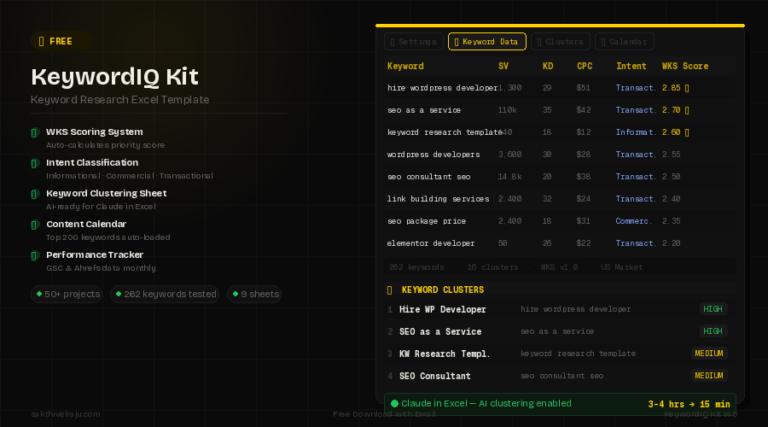
Clustering keywords used to be the most time-consuming part of my research process. After exporting 200+ keywords from Ahrefs, I’d have to manually read through them, identify which keywords shared the same topic and intent, and group them — one by one. For a 262-keyword list, that could take 3–4 hours alone.
Now I use Claude in Excel (an AI assistant built into Excel) to do the heavy lifting. My workflow:
- Export all keywords from Ahrefs with SV, KD, and CPC data into my keyword research Excel template
- Open Claude in Excel — it works directly inside the spreadsheet, no copy-pasting needed
- Give it a simple instruction: “Cluster these keywords by topic and search intent into a new sheet. Each cluster should have one primary keyword (highest SV) and list all related secondary keywords.”
- Claude reads all the data and builds the entire cluster sheet automatically — grouping keywords, naming clusters, and identifying primary vs secondary keywords
- I review the output — sometimes adjust 2–3 clusters based on my own knowledge of the niche — and the strategy is done
What used to take me 3–4 hours now takes about 10–15 minutes. The clusters are accurate because Claude analyses both the keyword wording and the intent signals simultaneously — something that’s very hard to do manually across 200+ rows.
⚡ Real Result: For sakthivelraju.com, Claude in Excel clustered my 262 keywords into 16 topic clusters in one pass. I reviewed and accepted nearly all of them with only minor adjustments. The manual version of this would have taken me a full afternoon.
This is a genuine workflow improvement I’d recommend to any SEO professional doing keyword research at scale. It’s not a replacement for your SEO judgment — you still review and refine the clusters — but it removes the repetitive manual work entirely.
Real Cluster Example — from sakthivelraju.com
Here’s an actual keyword cluster from my own site’s keyword research:
| Role | Keyword | Monthly SV | KD | Intent |
|---|---|---|---|---|
| ⭐ Primary | seo company website | 2,400 | 14 | Transactional |
| Secondary | best company seo | 8,100 | 18 | Transactional |
| Secondary | web design seo company | 3,600 | 8 | Transactional |
| Secondary | seo package price | 2,400 | 18 | Transactional |
| Secondary | seo price | 8100 | 26 | Transactional |
| Secondary | seo and website development | 1600 | 7 | Transactional |
Combined traffic potential: ~26,200 searches/month — all targeted by a single service page. That’s the power of keyword clustering. Instead of building 6 separate pages, one well-structured page can rank for all 6 keywords simultaneously.
Key clustering rule: Never create two pages targeting the same intent for the same topic — this is called keyword cannibalization and confuses Google about which page to rank. If you already have two such pages on your site, consolidate them into one comprehensive page.
Step 7: Prioritise With My WKS Scoring System
Build Your Content Priority Queue
You can’t create all your content at once. I use a custom scoring system I developed called the WKS Model (Weighted Keyword Scoring) to decide which clusters to tackle first.
The WKS model scores every keyword cluster across three factors:
- Traffic Potential (TP) — how much organic traffic could this cluster drive? Scored 1–3 based on combined search volume of all keywords in the cluster
- Ranking Feasibility (RF) — how realistic is it to rank for this keyword given your current domain authority? Scored 1–3 based on average KD (3 = easy, 1 = hard)
- Business Value (BV) — how directly does this keyword relate to your services and revenue? Scored 1–3 based on CPC as a proxy for commercial intent
Each factor gets a weighted score based on your site’s current situation. For a new site like mine, I weight RF (ranking feasibility) highest — because getting ranked on any keyword first matters more than targeting the highest-volume terms that I can’t win yet. As the site matures, I’ll shift weight toward BV.
The WKS score for each cluster is calculated automatically in my Excel template. Clusters with the highest scores go into my content calendar first. This prevents the common mistake of spending months on hard keywords that don’t rank, while easy wins sit untouched.
What to build first: Service pages for your core offerings (direct revenue) → high-volume informational posts on KD <15 (fast rankings + authority building) → commercial comparison posts (affiliate income + conversion traffic).
How Do You Do Keyword Research Using Competitor Analysis
One of the fastest ways to find keyword opportunities is to analyse what your competitors rank for. This is the process of keyword research and competitor analysis combined — and it often surfaces high-value targets you’d never have found through manual research alone.
How to do it with Ahrefs:
- Enter a competitor’s domain into Ahrefs Site Explorer
- Click “Organic Keywords” to see every keyword they rank for
- Filter for keywords with KD under 30 and SV over 200
- Export the list and check which of these keywords your site doesn’t yet target
- Add the best gaps to your keyword cluster strategy
I call this the “gap and steal” approach — you’re finding keywords your competitors have already proven are rankable, then creating better content to outrank them. Significantly more efficient than starting from scratch.
💡 Tip: Don’t just look at your direct competitors — also analyse sites that rank well in your broader topic area. A website that ranks for 50 keywords in your niche is a goldmine of validated keyword opportunities, even if they’re not technically a competitor.
Common Keyword Research Mistakes to Avoid
After 8 years and 50+ client projects, these are the keyword research errors I see most often — and that quietly kill organic traffic growth:
1. Targeting keywords by volume alone
A keyword with 50,000 monthly searches and KD 80 is worthless if you can’t rank for it. Always balance volume against difficulty and your current domain authority. A cluster of five keywords each averaging 500 monthly searches but KD under 15 is far more valuable to a new site than one keyword with 10,000 searches and KD 60.
2. Ignoring search intent
Creating the wrong content type for a keyword is the most common and most costly mistake. Always check the top 10 SERP results before writing — Google’s ranking pattern tells you exactly what content format performs for that keyword. If you see lists, write a list. If you see guides, write a guide. If you see product pages, write a product page.
3. Keyword cannibalization
Multiple pages on the same site competing for the same keyword confuses Google. The result is neither page ranks well. Audit your site regularly — if two pages target the same keyword cluster with the same intent, consolidate them into one strong page.
4. Skipping the relevance filter
High volume + low difficulty is meaningless if the keyword doesn’t actually relate to your business. A blog post ranking for an irrelevant keyword drives traffic that will never convert. Every keyword you target should serve a clear purpose — either direct revenue, brand authority, or audience building in your actual niche.
5. Not updating keyword research regularly
Keyword research is not a one-time exercise. Search volumes change, new topics emerge, competitors shift their strategies, and Google updates change what content formats rank. I revisit keyword strategies every 6 months for active clients — checking GSC data for new ranking opportunities and updating clusters based on performance data.
Frequently Asked Questions
For a new website, start by mapping your topic clusters — every service, product, or subject your site will cover. Then generate seed keywords for each topic using Google autocomplete and AnswerThePublic. Expand using Ahrefs or Google Keyword Planner, then filter for KD under 20 and SV over 100. For a new site, low-competition keywords (KD under 15) are your fastest path to organic traffic — focus here exclusively for the first 6–12 months before targeting harder keywords as your domain authority grows.
I use Claude in Excel to automate the keyword clustering step. After exporting my keyword data from Ahrefs into my WKS Excel template, I open Claude in Excel and instruct it to cluster all keywords by topic and intent into a new sheet. It reads the full dataset and builds the complete cluster structure automatically — naming clusters, assigning primary vs secondary keywords, and grouping by intent. What used to take me 3–4 hours of manual work now takes 10–15 minutes. I review the output and make minor adjustments based on my niche knowledge, then the strategy is ready. AI handles the repetitive pattern-recognition work; my expertise handles the judgment calls.
A focused keyword research session for a single topic cluster takes 1–2 hours. A full website keyword strategy covering 8–12 topic clusters typically takes 8–16 hours spread over 2–3 days — including seed generation, tool research, filtering, intent classification, clustering, and prioritisation. Using my WKS Excel template with Claude in Excel for AI-assisted clustering significantly reduces this time. For clients, I deliver a complete 200–400 keyword strategy with content calendar in approximately 3–5 business days.
There’s no fixed number — a page should target as many related keywords as can be covered naturally within a single piece of quality content. In practice, a typical service page or blog post can naturally cover 5–15 related keywords from the same cluster. The primary keyword should appear in the H1, URL, and first paragraph. Secondary keywords should appear in subheadings and body content naturally — never forced or stuffed. The metric that matters isn’t keyword count but whether your page comprehensively addresses the topic at a depth that outperforms competing pages on the same subject.
You can conduct keyword research for free using: Google Keyword Planner (unlimited searches, accurate volume), Google Search Console (for existing sites — real query data), Semrush free plan (10 searches/day), Google autocomplete and “People Also Ask” for seed expansion, and AnswerThePublic (3 free searches/day). The free toolset is enough to build a solid 50–100 keyword strategy. For larger-scale research (200+ keywords, competitor analysis, full cluster mapping) a paid tool like Ahrefs becomes worth the investment.
The most important keyword research best practices in 2026: (1) Always match content type to search intent before writing. (2) Build keyword clusters — one page targeting many related keywords — rather than targeting one keyword per page. (3) Prioritise topical authority over individual keywords — Google rewards sites that cover a topic comprehensively. (4) Use Google Search Console data to find keywords where you already rank on page 2 — these are your fastest optimisation opportunities. (5) Check competitor keyword gaps with Ahrefs — this surfaces high-value targets faster than manual research. (6) Refresh your keyword strategy every 6 months as search volumes and competition shift.
Keyword research is the process of finding keywords people search for in your topic area. Competitor analysis specifically means analysing what keywords your competitors already rank for — identifying gaps between their keyword coverage and yours. Both are essential parts of the same strategy. Start with your own topic-based keyword research to understand the full landscape, then layer in competitor analysis to find high-value targets your competition has already validated. The combination is much more powerful than either approach alone.